Sub Test()
Dim cst1 As Integer
Dim cst As Integer
Dim t, t1 As Task
Dim OutlineLevel As Integer
cst1 = 0
OutlineLevel = 1
While OutlineLevel < 15
For Each t In ActiveProject.Tasks
If Not (t Is Nothing) Then
If (t.OutlineLevel = OutlineLevel And t.Summary = True) Then
For Each t1 In t.OutlineChildren
cst = t1.Cost1
cst1 = cst + cst1
Next t1
t.Cost1 = cst1
cst1 = 0
End If
End If
Next t
OutlineLevel = OutlineLevel + 1
Wend
End Sub
Thursday, May 5, 2011


Monday, October 11, 2010
Apply Validation using Javascript in Sharepoint
1. Add the CEWP on the EditForm or Newform.aspx
2. Paste Below script in that and change the types and respective Control names
3. To pass correct parameter in the "TagName" function follow
TAGNAME: HTML element that is being rendered ("SELECT", "INPUT"...)
IDENTIFIER: SharePoint field type identifier ("TextField", "DropDownChoice"...)
FIELD NAME: Display name of the field (e.g. "Status", "Customer Name"...)
function PreSaveAction()
{
  var Email = TagName("INPUT","TextField","Customer Email Id");
   var result=checkEmail(Email.value);
 if(result== "0")
    {
        alert("Please enter proper Email address");
        return false; // Cancel the item save process
    }
   return true;

}
function TagName(tagName, identifier, title) {
var len = identifier.length;
var tags = document.getElementsByTagName(tagName);
for (var i=0; i < tags.length; i++) {
var tempString = tags[i].id;
if (tags[i].title == title && (identifier == "" || tempString.indexOf(identifier) == tempString.length - len)) {
return tags[i];
}
}
return null;
}
function checkEmail(inputvalue){
    var pattern=/^([a-zA-Z0-9_.-])+@([a-zA-Z0-9_.-])+\.([a-zA-Z])+([a-zA-Z])+/;
    if(pattern.test(inputvalue)){
  return 1;
    }else{
         return 0;
    }
}
Sunday, October 10, 2010
Create Full WBS Structure in MSP 2007
Recently got a requirement to create the Full WBS structure with the Task Names in the MSP 2007.
Following is the Macro to achieve the same:
Sub Test()
Dim str As String
Dim t As Task
Dim OutlineLevel As Integer
OutlineLevel = 1
While OutlineLevel < 15
For Each t In ActiveProject.Tasks
If Not (t Is Nothing) Then
If t.OutlineLevel = OutlineLevel Then
t.Text10 = t.OutlineParent.Text10 & "." & t.Name
End If
End If
Next t
OutlineLevel = OutlineLevel + 1
Wend
End Sub
And we are done, It has helped when i was suppose to give data back to my client where they needed the Full path so they can map it with their actual data.
Hope this will help someone.. J
Thursday, October 7, 2010
Reading List Items using JQuery
Recently got an Requirement where i was suppose to send a request to customer to fill the Questionnaire for the feedback...
- Below form will be initiated by the Project Manager to have the customer feedback.
 Mail will reach to the Client with the hyper link of the List's Edit item, An Item will be added to the Customer Feedback form and also Mail will be Shoot the client
Then Client will see the below shown form
And He will fill the Questionnaire and later on the CFB Score will get sync to the Project Server. - So how can we achieve such scenario, here we go open the list's EditForm.aspx and place the content editor webpart and place them above the form control.
- And here we Go >>
First Give the reference to the JQuery Folder as usual..
<script language="javascript" type="text/javascript" src="/_layouts/jquery/jquery-1.3.2.min.js"></script>
To Fetch the ID's Value from the Query String....
function queryString(parameter) {
var loc = location.search.substring(1, location.search.length);
var param_value = false;
var params = loc.split("&");
for (i=0; i<params.length;i++) {
param_name = params[i].substring(0,params[i].indexOf('='));
if (param_name == parameter) {
param_value = params[i].substring(params[i].indexOf('=')+1)
}
}
if (param_value) { return param_value; }
else { return false; //Here determine return if no parameter is found }
}
var param=queryString('ID');
This will Fetch the data from Web Services - Now based on the Id fetched from the query string we have to traverse through the data which we have got using webservices used in below code
<script language="javascript"> - $(document).ready(function(){
var soapEnv_CFF =
"<soapenv:Envelope xmlns:soapenv='http://schemas.xmlsoap.org/soap/envelope/'> \
<soapenv:Body> \
<GetListItems xmlns='http://schemas.microsoft.com/sharepoint/soap/'> \
<listName>Customer Feedback Form</listName> \
<viewFields> \
<ViewFields> \
<FieldRef Name='Id' /> \
<FieldRef Name='Title' /> \
</ViewFields> \
</viewFields> \
</GetListItems> \
</soapenv:Body> \
</soapenv:Envelope>";
$.ajax({
url: "../../_vti_bin/lists.asmx",
type: "POST",
dataType: "xml",
data: soapEnv_CFF,
complete: processResult_CFF,
contentType: "text/xml; charset=\"utf-8\""
});
}); - This Function will fetch data which we require to populate based on the IDs and append their values in the variable which we are going to use in the html representation


- function processResult_CFF(xData, status) {
$(xData.responseXML).find("z\\:row").each(function() {
if($(this).attr("ows_ID")==param) {
param=$(this).attr("ows_Title");
var liHtml = "<td>Sow No./Workorder No :</td><td>" + $(this).attr("ows_ID") + "</td><td></td><td></td>" ;
$("#tasksUL").append(liHtml);
}
});
}
</script> - This is the HTML tags where we can use the appended html content
<table style="background-color:Silver" border="0" cellspacing="2" cellpadding="1" width="100%">
<tr style="background-color:#d6ebff" id="tasksUL"></tr>
</table>
</html>
So without using the sharepoint designer we can actually show the data from other list using jQuery and content editor webpart. really easy, isnt it..!!? :)
Wednesday, October 6, 2010
Hide SharePoint List Items from New Form or Edit Form without SP Designer
So, what if you want to hide fields from the SharePoint list without tempering the list in SP Designer. Here is the Script.... J
- Open the NewForm.aspx or EditForm.aspx
- "&PageView=Shared&ToolPaneView=2" Add this text in the url and you can open the page in edit mode
- Add the CEWP and Click on the source Editor
And put the below script in it...
<script language="javascript" type="text/javascript">
_spBodyOnLoadFunctionNames.push("hideFields");
function findacontrol(FieldName)
{
var arr = document.getElementsByTagName("!");
// get all comments
for (var i=0;i < arr.length; i++ )
{
// now match the field name
if (arr[i].innerHTML.indexOf(FieldName) > 0)
{ return arr[i]; }
}
}
function hideFields()
{
var control = findacontrol("CustomerID");
control.parentNode.parentNode.style.display="none";
}
</script>
See, the script is pretty simple, you can push your own Function on the page load and then it will call hideFields() Function which will find out the Control name from the page's HTML and set that display to "none", its done.
Add list Items using JQuery
Recently i got an requirement where i was suppose to add list items using JavaScript as we did not have access to the server side code, and we were not able to write code on the server.
So Here we go...
- Add JQuery to your Layouts Folder and give reference to the CEWP
<script type="text/javascript" src="/_layouts/jquery/jquery-1.3.2.min.js"></script>
- Add the Script which will initialize the Web Service and Create the XML
$(document).ready(function() {
$("#newTaskButton").click(function() {
CreateNewItem($("#newTaskTitle").val());
});
});
function CreateNewItem(title) {// The CAML to create a new item and set the Title field.
var batch ="<Batch OnError=\"Continue\"> \
<Method ID=\"1\" Cmd=\"New\"> \
<Field Name=\"Title\">" + title + "</Field> \
</Method> \
</Batch>";
// The SOAP Envelope
var soapEnv =
"<?xml version=\"1.0\" encoding=\"utf-8\"?> \
<soap:Envelope xmlns:xsi=\"http://www.w3.org/2001/XMLSchema-instance\" \
xmlns:xsd=\"http://www.w3.org/2001/XMLSchema\" \
xmlns:soap=\"http://schemas.xmlsoap.org/soap/envelope/\"> \
<soap:Body> \
<UpdateListItems xmlns=\"http://schemas.microsoft.com/sharepoint/soap/\"> \
<listName>Tasks</listName> \
<updates> \
" + batch + "</updates> \
</UpdateListItems> \
</soap:Body> \
</soap:Envelope>";
// Build the URL of the Lists.asmx web service.
// This is done by stripping the last two parts (/doclib/page) of the URL.
var hrefParts = window.location.href.split('/');
var wsURL = "";
for (i = 0; i < (hrefParts.length - 2); i++) {
if (i > 0)
wsURL += "/";
wsURL += hrefParts[i];
}
wsURL += "/Pilot/_vti_bin/lists.asmx";
// Make the call by posting the SOAP Envelope.
$.ajax({
url: wsURL,
beforeSend: function(xhr) {
xhr.setRequestHeader("SOAPAction",
"http://schemas.microsoft.com/sharepoint/soap/UpdateListItems");
},
type: "POST",
dataType: "xml",
data: soapEnv,
complete: processResult,
contentType: "text/xml; charset=utf-8"
});
}
function processResult(xData, status) {
// Process the result.
$("#responseStatus").text(status);
$("#responseXML").text(xData.responseXML.xml);
}
- Create an HTML Control
<input id="newTaskTitle" type="text" />
<input id="newTaskButton" type="button" value="Create Task" />
<h5>
Response:
<label id="responseStatus" visibility="false">N/A </label>
</h5>
Now All put together and you are done.....!!!!
Friday, July 24, 2009
Project server data on MAP
The project server data can be come here on the map using Bing services of the Windows live map.
Wednesday, June 24, 2009
Add Rows dynamically to Gridview
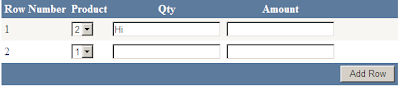
First of all how is the Result will look a like :
</ItemTemplate>
</asp:TemplateField>
<asp:TemplateField HeaderText="Qty">
<asp:TemplateField HeaderText="Amount">
<PagerStyle BackColor="#284775" ForeColor="White" HorizontalAlign="Center" />
<SelectedRowStyle BackColor="#E2DED6" Font-Bold="True" ForeColor="#333333" />
<HeaderStyle BackColor="#5D7B9D" Font-Bold="True" ForeColor="White" />
<EditRowStyle BackColor="#999999" />
<AlternatingRowStyle BackColor="White" ForeColor="#284775" />
</asp:GridView>
DataRow dr = dr = dt.NewRow();
//Store the DataTable in ViewState
if (ViewState["CurrentTable"] != null)
DataRow drCurrentRow = null;
if (dtCurrentTable.Rows.Count > 0)
private void PreviousGridData()
int rowIndex = 0;
if (ViewState["CurrentTable"] != null)
DataTable dt = (DataTable)ViewState["CurrentTable"];
if (dt.Rows.Count > 0)
for (int i = 1; i < dt.Rows.Count; i++)
DropDownList drp = (DropDownList)grvForm.Rows[rowIndex].Cells[1].FindControl("drp");

Ok, let's start with the page Design:
Drop a Grid and in the design page & then put the control inside the Template Fields Column.
Like
<
asp:GridView ID="grvForm" AutoGenerateColumns="False" ShowFooter="True" runat="server" CellPadding="4" ForeColor="#333333" GridLines="None"><RowStyle BackColor="#F7F6F3" ForeColor="#333333" />
<Columns><asp:BoundField DataField="RowNumber" HeaderText="Row Number" />
<asp:TemplateField HeaderText="Product"><ItemTemplate><asp:DropDownList ID="drp" runat="server"><asp:ListItem Text="1" Value="1"></asp:ListItem><asp:ListItem Text="2" Value="2"></asp:ListItem></asp:DropDownList>
</ItemTemplate>
</asp:TemplateField>
<asp:TemplateField HeaderText="Qty">
<ItemTemplate>
<asp:TextBox ID="txtQty" runat="server"></asp:TextBox>
</ItemTemplate>
</asp:TemplateField>
<asp:TemplateField HeaderText="Amount">
<ItemTemplate>
<asp:TextBox ID="txtAmount" runat="server"></asp:TextBox>
</ItemTemplate>
</asp:TemplateField>
<asp:TemplateField FooterText="Add Row">
<FooterTemplate>
<asp:Button ID="btnAddRow" runat="server" Text="Add Row" onclick="btnAddRow_Click" />
</FooterTemplate>
</asp:TemplateField>
</Columns>
<FooterStyle BackColor="#5D7B9D" Font-Bold="True" ForeColor="White" />
<PagerStyle BackColor="#284775" ForeColor="White" HorizontalAlign="Center" />
<SelectedRowStyle BackColor="#E2DED6" Font-Bold="True" ForeColor="#333333" />
<HeaderStyle BackColor="#5D7B9D" Font-Bold="True" ForeColor="White" />
<EditRowStyle BackColor="#999999" />
<AlternatingRowStyle BackColor="White" ForeColor="#284775" />
</asp:GridView>
then on the page Load we have to bind the Grid and that Grid should show 1 Blank Row as shown below:
After that we will write code for the AddRow Button..
Now in the Page_Load Event Write following code.
DataTable
dt = new DataTable();DataRow dr = dr = dt.NewRow();
dt.Columns.Add(
new DataColumn("RowNumber", typeof(string)));dt.Columns.Add(
new DataColumn("Column1", typeof(string)));dt.Columns.Add(
new DataColumn("Column2", typeof(string)));dt.Columns.Add(
new DataColumn("Column3", typeof(string)));dr = dt.NewRow();
dr[
"RowNumber"] = 1;dr[
"Column1"] = string.Empty;dr[
"Column2"] = string.Empty;dr[
"Column3"] = string.Empty;dt.Rows.Add(dr);
//Store the DataTable in ViewState
ViewState[
"CurrentTable"] = dt;grvForm.DataSource = dt;
grvForm.DataBind();
after that we need to write code for the AddRow Function, and also we have to store the previous data(which has been put by the user) in the ViewState or session.
Now, code for that is as shown below:
private
void AddNewRowToGrid(){
int rowIndex = 0;
if (ViewState["CurrentTable"] != null)
{
DataTable dtCurrentTable = (DataTable)ViewState["CurrentTable"];
DataRow drCurrentRow = null;
if (dtCurrentTable.Rows.Count > 0)
{
for (int i = 1; i <= dtCurrentTable.Rows.Count; i++)
{
////extract the TextBox values
DropDownList drp = (DropDownList)grvForm.Rows[rowIndex].Cells[1].FindControl("drp");
TextBox txtQty = (TextBox)grvForm.Rows[rowIndex].Cells[2].FindControl("txtQty");
TextBox txtAmount = (TextBox)grvForm.Rows[rowIndex].Cells[3].FindControl("txtAmount");drCurrentRow = dtCurrentTable.NewRow();
drCurrentRow[
"RowNumber"] = i + 1;drCurrentRow[
"Column1"] = drp.SelectedItem.Text;drCurrentRow[
"Column2"] = txtQty.Text;drCurrentRow[
"Column3"] = txtAmount.Text;rowIndex++;
}
dtCurrentTable.Rows.Add(drCurrentRow);
ViewState["CurrentTable"] = dtCurrentTable;
grvForm.DataSource = dtCurrentTable;
grvForm.DataBind();
}
}
else
{
"ViewState is null");Response.Write(
}
PreviousGridData();
}
Now we will write the code for the PreviousGridData(); the code for this function is as shown below:
private void PreviousGridData()
{
int rowIndex = 0;
if (ViewState["CurrentTable"] != null)
{
DataTable dt = (DataTable)ViewState["CurrentTable"];
if (dt.Rows.Count > 0)
{
for (int i = 1; i < dt.Rows.Count; i++)
{
DropDownList drp = (DropDownList)grvForm.Rows[rowIndex].Cells[1].FindControl("drp");
TextBox txtQty = (T extBox)grvForm.Rows[rowIndex].Cells[2].FindControl("txtQty");
TextBox txtAmount = (TextBox)grvForm.Rows[rowIndex].Cells[3].FindControl("txtAmount");
drp.Text = dt.Rows[i][
"Column1"].ToString();txtQty.Text = dt.Rows[i][
"Column2"].ToString();txtAmount.Text = dt.Rows[i][
"Column3"].ToString();rowIndex++;
}
}
}
}
and you are done...!! Build the solution and hit Play....
Hope this helps some one.
P.s if you feel that this post has helped you, please do write your comments.
Thanks
Monday, June 15, 2009
Tuesday, April 28, 2009
Simple Gridview Webpart for Sharepoint
Open Visual Studio.....
Click on New >> Project >> and following screen will appear there select "Server controll" give any name you want to give :

then in the solution explorer 1 class file will be created give any suitable name to the class file ; here create a public class for the WebPart and then write following code to create a TextBox inside a Webpart where we will write our Queries to populate the Grid:
The pseudocode for that is as follows:
private string sqlquery;
[Personalizable(), WebBrowsable(true),WebDisplayName("SQLQuery"),Category("Data Properties")]
public string SQLQuery
{
get { return sqlquery; }
set { sqlquery = value; }
}
Here in the code above you can see the Text called as "Data Properties" that is the section for the name ; you can give what ever name you want for that section.
Now will create a childcontrol for this.
protected override void CreateChildControls()
{
base.CreateChildControls();
try
{
GridView grv = new GridView();
DataSet ds = new DataSet();
SqlDataAdapter da = new SqlDataAdapter();
string strConnection = System.Configuration.ConfigurationSettings.AppSettings.Get("connection");
string sql = sqlquery;
//DataTable dt = new DataTable();
//dt = objDB.GetSQlResult(sql);
da = new SqlDataAdapter(sql, strConnection);
ds.Clear();
da.Fill(ds, "data");
Controls.Add(grv);
grv.DataSource = ds.Tables[0].DefaultView;
grv.GridLines = GridLines.Horizontal;
grv.CellPadding = 6;
grv.DataBind();
grv.HeaderStyle.BackColor = System.Drawing.Color.LightGray;
}
catch (Exception ex)
{}
}
this code will create the Gridview webpart now you can build the solution and you can give the output path of you build to the Bin folder of the sharepoint site or you create a dll with the strogn name.
1. double click on the properties >> signing and it will allow you to give the string name for that.
2. After that deploy that dll to the Windows >> Assembly and then right-click the dll and have a look at the properties there you will find PublicKeyToken.
3. Then go to the Sharepoint's Web.Config file and register this control as Safecontrol it will look something like this:
Now open the sharepoint site and go to the Site settings >> Web parts >> New
There you will find your web part with the extension (webpart) and checked it and click on the populate gallery.
To check the webpart you create a new web part page and then click on the add web part , it will open a box there you will see your web part. add it to your page it will look something like this:
 Here you will have an option of Edit the web part click on that and you will a contex menu on side there you will be able to see the "Data Propertie" under that you will find textbox ; there you can write your Query. and accordingly Data will get populated.
P.s : here i have assumed that you will have a connection string inside the Web.Config you can write the connection string dynamically also, by assigning some more Properties for the web part as we have created "data properties." , you can create some more..!!
Tuesday, December 9, 2008
Cup of Coffee
A group of alumni, highly established in their careers, got together to visit their old university professor.
Conversation soon turned into complaints about stress in work and life.
Offering his guests coffee, the professor went to the kitchen and returned with a large pot of coffee and an assortment of cups porcelain, plastic, glass, crystal, some plain looking, some expensive, some exquisite - telling them to help themselves to hot coffee .
When all the students had a cup of coffee in hand, the professor said: "If you noticed, all the nice looking expensive cups were taken up, leaving behind the plain and cheap ones. While it is but normal for you to wantonly the best for yourselves, that is the source of your problems and stress. What all of you really wanted was coffee, not the cup, but you consciously went for the best cups and were eyeing each other's cups.

Now if life is coffee, then the jobs, money and position in society are the cups. They are just tools to hold and contain Life, but the quality of Life doesn't change. Sometimes, by concentrating only on the cup, we fail to enjoy the coffee in it."
Don't let the cups drive you... Enjoy the coffee instead.
Monday, August 11, 2008
unconditional Love
Real Nice Story:
My wife called, 'How long will you be with that newspaper? Will you come here and make your darling daughter eat her food?
I tossed the paper away and rushed to the scene. My only daughter, Sindu, looked frightened; tears were welling up in her eyes. In front of her was a bowl filled to its brim with curd rice. Sindu is a nice child, quite intelligent for her age.
I cleared my throat and picked up the bowl. 'Sindu, darling, why don't , you take a few mouthful of this curd rice? Just for Dad's sake, dear'. Sindu softened a bit and wiped her tears with the back of her hands. 'Ok, Dad. I will eat - not just a few mouthfuls, but the whole lot of this.
But, you should...' Sindu hesitated. 'Dad, if I eat this entire curd Rice, will you give me whatever I ask for?'
'Promise'. I covered the pink soft hand extended by my daughter with mine, and clinched the deal. Now I became a bit anxious. 'Sindu, dear, you shouldn't insist on getting a computer or any such expensive items. Dad does not have that kind of money right now. Ok?'
'No, Dad. I do not want anything expensive'. Slowly and painfully, she finished eating the whole quantity. I was silently angry with my wife and my mother for forcing my child to eat something that she detested. After the ordeal was through, Sindu came to me with her eyes wide with
expectation. All our attention was on her.
'Dad, I want to have my head shaved off, this Sunday!' was her demand.
'Atrocious!' shouted my wife, 'A girl child having her head shaved off? Impossible!'
'Never in our family!' My mother rasped. 'She has been watching too much of television. Our culture is getting totally spoiled with these TV programs!'
'Sindu, darling, why don't you ask for something else? We will be sad seeing you with a clean-shaven head.'
'Please, Sindu, why don't you try to understand our feelings?' I tried to plead with her.
'Dad, you saw how difficult it was for me to eat that Curd Rice'. Sindu was in tears. 'And you promised to grant me whatever I ask for. Now, you are going back on your words. Was it not you who told me the story of* *King Harishchandra, and its moral that we should honor our promises no matter what?'
It was time for me to call the shots. 'Our promise must be kept.'
'Are you out of your mind?' chorused my mother and wife.
'No. If we go back on ourpromises, she will never learn to honour her own. Sindu, your wish will be fulfilled.'
With her head clean-shaven, Sindu had a round-face, and her eyes looked big and beautiful.
On Monday morning, I dropped her at her school. It was a sight to watch my hairless Sindu walking towards her classroom. She turned around and waved. I waved back with a smile. Just then, a boy alighted from a car, and shouted, 'Sinduja, please wait for me!' What struck me was the hairless head of that boy. 'May be, that is the in-stuff', I thought.
'Sir, your daughter Sinduja is great indeed!' Without introducing herself, a lady got out of the car, and continued, 'that boy who is walking along with your daughter is my son Harish. He is suffering from... leukemia'. She paused to muffle her sobs. 'Harish could not attend the
school for the whole of the last month. He lost all his hair due to the side effects of the chemotherapy. He refused to come back to school fearing the unintentional but cruel teasing of the schoolmates. Sinduja visited him last week, and promised him that she will take care of the teasing issue. But, I never imagined she would sacrifice her lovely hair for the sake of my son!
Sir, you and your wife are blessed to have such a noble soul as your daughter.'
I stood transfixed and then, I wept. 'My little Angel, you are teaching me how selfless real love is!'
The happiest people on this planet are not those who live on their own terms but are those who change their terms for the ones whom they love !!*
My wife called, 'How long will you be with that newspaper? Will you come here and make your darling daughter eat her food?
I tossed the paper away and rushed to the scene. My only daughter, Sindu, looked frightened; tears were welling up in her eyes. In front of her was a bowl filled to its brim with curd rice. Sindu is a nice child, quite intelligent for her age.
I cleared my throat and picked up the bowl. 'Sindu, darling, why don't , you take a few mouthful of this curd rice? Just for Dad's sake, dear'. Sindu softened a bit and wiped her tears with the back of her hands. 'Ok, Dad. I will eat - not just a few mouthfuls, but the whole lot of this.
But, you should...' Sindu hesitated. 'Dad, if I eat this entire curd Rice, will you give me whatever I ask for?'
'Promise'. I covered the pink soft hand extended by my daughter with mine, and clinched the deal. Now I became a bit anxious. 'Sindu, dear, you shouldn't insist on getting a computer or any such expensive items. Dad does not have that kind of money right now. Ok?'
'No, Dad. I do not want anything expensive'. Slowly and painfully, she finished eating the whole quantity. I was silently angry with my wife and my mother for forcing my child to eat something that she detested. After the ordeal was through, Sindu came to me with her eyes wide with
expectation. All our attention was on her.
'Dad, I want to have my head shaved off, this Sunday!' was her demand.
'Atrocious!' shouted my wife, 'A girl child having her head shaved off? Impossible!'
'Never in our family!' My mother rasped. 'She has been watching too much of television. Our culture is getting totally spoiled with these TV programs!'
'Sindu, darling, why don't you ask for something else? We will be sad seeing you with a clean-shaven head.'
'Please, Sindu, why don't you try to understand our feelings?' I tried to plead with her.
'Dad, you saw how difficult it was for me to eat that Curd Rice'. Sindu was in tears. 'And you promised to grant me whatever I ask for. Now, you are going back on your words. Was it not you who told me the story of* *King Harishchandra, and its moral that we should honor our promises no matter what?'
It was time for me to call the shots. 'Our promise must be kept.'
'Are you out of your mind?' chorused my mother and wife.
'No. If we go back on ourpromises, she will never learn to honour her own. Sindu, your wish will be fulfilled.'
With her head clean-shaven, Sindu had a round-face, and her eyes looked big and beautiful.
On Monday morning, I dropped her at her school. It was a sight to watch my hairless Sindu walking towards her classroom. She turned around and waved. I waved back with a smile. Just then, a boy alighted from a car, and shouted, 'Sinduja, please wait for me!' What struck me was the hairless head of that boy. 'May be, that is the in-stuff', I thought.
'Sir, your daughter Sinduja is great indeed!' Without introducing herself, a lady got out of the car, and continued, 'that boy who is walking along with your daughter is my son Harish. He is suffering from... leukemia'. She paused to muffle her sobs. 'Harish could not attend the
school for the whole of the last month. He lost all his hair due to the side effects of the chemotherapy. He refused to come back to school fearing the unintentional but cruel teasing of the schoolmates. Sinduja visited him last week, and promised him that she will take care of the teasing issue. But, I never imagined she would sacrifice her lovely hair for the sake of my son!
Sir, you and your wife are blessed to have such a noble soul as your daughter.'
I stood transfixed and then, I wept. 'My little Angel, you are teaching me how selfless real love is!'
The happiest people on this planet are not those who live on their own terms but are those who change their terms for the ones whom they love !!*
Thursday, July 17, 2008
Drinking Coffee A Pattern....
Jai Gurudev
Now days we have started AHTAVAKRA GITA.
We start our day with Group Sadhan and after that we listen to the GITA, now on the 2nd day of the Ashtavakra Gita (15th July 08),

I woke up early at 4:30 am and had my bath after that i reached to center for Group sadhna but do i really missing something........!? i asked to my self and LOL, i found the answer that i didnt drink my tea...;) i immediately realized my problem and directly head towards a Shop for early morning TEA.
When i reached to shop, ordered a tea...........whille drinking my tea. i came to know Ahhhh......I just LOST my vollate Now I immediatly went to the road and went to the center the same way i had gone to the Tea Shop.......and after reaching to the center i realized that i didn’t brought my vollate, i just worrying for nothing. I was happy at that time,after i went and paid to the Shopekeeper and come back to the Center and done my Kria.
After Kriya we started the knowledge session, and 1st thing speak is about Patterns,Habits and he gives the examples of Coffee only.
He said that we have our own pattern i.e Drinking Coffee and several other examples.
Which is really cause of misery and it really pinches in my heart, after that i make a point to drink tea atleast not in the early morning and strictly not when some knowledge session is going on.........Guru is great
Hope in the upcoming days of Ashtavakra Gita, nothing that sort of thing will happen
Jai gurdev
Now days we have started AHTAVAKRA GITA.
We start our day with Group Sadhan and after that we listen to the GITA, now on the 2nd day of the Ashtavakra Gita (15th July 08),

I woke up early at 4:30 am and had my bath after that i reached to center for Group sadhna but do i really missing something........!? i asked to my self and LOL, i found the answer that i didnt drink my tea...;) i immediately realized my problem and directly head towards a Shop for early morning TEA.
When i reached to shop, ordered a tea...........whille drinking my tea. i came to know Ahhhh......I just LOST my vollate Now I immediatly went to the road and went to the center the same way i had gone to the Tea Shop.......and after reaching to the center i realized that i didn’t brought my vollate, i just worrying for nothing. I was happy at that time,after i went and paid to the Shopekeeper and come back to the Center and done my Kria.
After Kriya we started the knowledge session, and 1st thing speak is about Patterns,Habits and he gives the examples of Coffee only.
He said that we have our own pattern i.e Drinking Coffee and several other examples.
Which is really cause of misery and it really pinches in my heart, after that i make a point to drink tea atleast not in the early morning and strictly not when some knowledge session is going on.........Guru is great
Hope in the upcoming days of Ashtavakra Gita, nothing that sort of thing will happen
Jai gurdev
Monday, July 7, 2008
How I learnt the RudraBhishek.......
Actually I was waiting for the inner call to write something about rudrabhishek, I guess today is the day.

It all started during Feb-04 when we heard that guruji is coming to ahmedabad for shivratri before that we had done some seva to gather people and also sold some kria passes as always and the day had come when 50+ people went to ahmedabad early morning 5 o’clock for Long kria which was taken by guruji himself and afterwards seva and then rudrapuja started in the evening.
We were bit of thrilled as explained by Guruji, then he took the meditation and it was amazing as always afterwards, truly speaking not much interested in rudrabhishek when it started but as soon as PANCHA GAVYA SNANAM STARTED i was literally amazed by seeing that imagine 1 egg shaped transparent object fully covered by the yellowish brown white kind of something (which is Milk, curd, ghee, honey and sugar), looks so nice.
Then started Namakam- chamankam as per Guruji namakam means salt which is present every where like wise seeing Shiv Tatva in everything for example it says I am seeing Shiv in Fisherman and I am bowing to that shiv in that person etc, like wise it consists plenty of other things, then started Chamakam which is asking everything to Lord shiv saying I need good sleep, iron, gold, food almost everything which is available in this universe.

Afterwards when puja was over Gurji dance, I am in AOL since 1999 I have never ever seen guruji dancing like that before. And that was the time where almost everybody started crying and that was the turning point I decided to learn Rudrabhishek.
My father is very much co-operative to me, and then Grace part starts when I started learning naturally my father arranged teacher me who comes on every sat-sun to our place and teaches me Rudrabhishek in Gujarat it is consists of 10 adhyay .8 of Rudrabhieshek + 2 shanti adhyay and it is of 70 pages long but see the grace I had learnt it within 3 months time which is continuous 24 Days only, my teacher was so impressed with me that he said he had taught plenty of students but I was student who learnt it very quickly and what we chant here in ashram is even more simple as it consist of only 2 Adhyay (NaMaKaM-ChMaKam).
Till today I am performing rudrabhishek everyday and those 2 hours of my day is always amazing no matter how I feel that time during the puja is simply amazing.
Thanks to Guruji by whose grace I learnt it..!
Here the best part is everything arranged for me automatically and the learning period was so reduced that till today I am amazed that how did I learnt it…!? It was so without any effort
And during my learning period of it I encounter plenty of concepts attached to rudrabhishek which we will take in some other posts.

It all started during Feb-04 when we heard that guruji is coming to ahmedabad for shivratri before that we had done some seva to gather people and also sold some kria passes as always and the day had come when 50+ people went to ahmedabad early morning 5 o’clock for Long kria which was taken by guruji himself and afterwards seva and then rudrapuja started in the evening.
We were bit of thrilled as explained by Guruji, then he took the meditation and it was amazing as always afterwards, truly speaking not much interested in rudrabhishek when it started but as soon as PANCHA GAVYA SNANAM STARTED i was literally amazed by seeing that imagine 1 egg shaped transparent object fully covered by the yellowish brown white kind of something (which is Milk, curd, ghee, honey and sugar), looks so nice.
Then started Namakam- chamankam as per Guruji namakam means salt which is present every where like wise seeing Shiv Tatva in everything for example it says I am seeing Shiv in Fisherman and I am bowing to that shiv in that person etc, like wise it consists plenty of other things, then started Chamakam which is asking everything to Lord shiv saying I need good sleep, iron, gold, food almost everything which is available in this universe.

Afterwards when puja was over Gurji dance, I am in AOL since 1999 I have never ever seen guruji dancing like that before. And that was the time where almost everybody started crying and that was the turning point I decided to learn Rudrabhishek.
My father is very much co-operative to me, and then Grace part starts when I started learning naturally my father arranged teacher me who comes on every sat-sun to our place and teaches me Rudrabhishek in Gujarat it is consists of 10 adhyay .8 of Rudrabhieshek + 2 shanti adhyay and it is of 70 pages long but see the grace I had learnt it within 3 months time which is continuous 24 Days only, my teacher was so impressed with me that he said he had taught plenty of students but I was student who learnt it very quickly and what we chant here in ashram is even more simple as it consist of only 2 Adhyay (NaMaKaM-ChMaKam).
Till today I am performing rudrabhishek everyday and those 2 hours of my day is always amazing no matter how I feel that time during the puja is simply amazing.
Thanks to Guruji by whose grace I learnt it..!
Here the best part is everything arranged for me automatically and the learning period was so reduced that till today I am amazed that how did I learnt it…!? It was so without any effort
And during my learning period of it I encounter plenty of concepts attached to rudrabhishek which we will take in some other posts.
Jai Gurudev

Batch Insert from GridView

Some time back i have done simple timesheet with no extra thing doing just insert my data from Gridview which will come as forms to user and User will Fill the form and and click on the BUTTON and his data for that day will get Saved for that Day.

Here in above image where button event is there so that using this we can insert the data into the database.
Here, Logic is very simple we are looping through the Grid and inserting the data by finding control within the Asp:TemplateField and we are done doing it.
Thanks
Hope this will be helpful to someone.
Parth
Friday, July 4, 2008
Row to Column Conversion with help of ReportViewer
some time back i was in need for converting row of my data to column as my rows were of Project names of an Organization and Columns where of TaskNames...so being a Database person i tried doing it using SQL but after that thought it may increase my server's CPU cycle, so better to handle this scenario with report viewer..... and some how i was able to d it successfully.....
1. Add .rdlc file in your project solution
2. Add .xsd in your App_code folders

3. Drag and drop Matrix report then put your required field into the Matrix Report's column and part and datapart

4. then bind your reportviewer into code behind, this is the tricky part as this will help you having total control of report ...if in future you want to add Dropdown and On DropDown selection you want to show Report, it is easily possible.

Tell me if any clarification is req. cause here you can do many things like, chnage the back color of cell of your report by just providing VB code (of course conditionally and dynamic.......) you can also change Textsize,Italic,Underline etc..conditionaly.... All of the above is possible in the design view of.rdlc file.
Thanks & Regards
Parth
Heirarchical Grid or Parent childgridView using javascript


A very simple thing which is most often required by the developers is creating the Hierarchical grid view or in other words Parent-Child Grid....
Some of the Organizations where they maintain Parent-Child relationships in their process required such kind of data representation....
Scenario:
In a certain organization you need to have a Project Under particular project you must have tasks,this will create your Hierarchical Grid
1.We have to create 1 grid and then add TemplateField Column,after put 2nd Grid inside the TemplateField Column put DataKeyName of Key Column which common in both Grid'd data like ProejctGroup then bind the Grid
2.Put + sign in First Column and put that inside Div tab in your grid view column

3.then Bind the 2nd grid on rowdataboundevent

4.put the javascript code as shown below

Now simple you parent grid will bind your child grid and it will go on and on doind Hierarchi of data and you are done doing it...!
cheers
Hope this will be helpful to some one.
Thanks
Parth
Present moment
Some time back when i was in Ashram, we were with the course participants......and satsang was just about to begin at that time we told course participants ( of Part-I) and we were just talking to eachother experience at that time one of us just spoke that rain usualy never comes at the time of satsang and now we just dont even bother about it also as it is tasken for granted...;) &....

suddenly rain started and we all have to rush to the VM andVM was jam packed....after some time guruji came and we were just alone with him .....me and vinod has wave hand to them he done the same with us......after 1 second or so , he turned around and looked at me and ask me to be careful as i was about to touch a live wire...and i was certainly not aware of it.....;)
It shows guruji remains in present moment always as he takes care for every one like child to him
Now, the day come, it was 29th June
again we went for satsang on Sunday...again the same situation it was about to rain and it rained also but at this time satsang was going on....
Guruji came at the place of satsang usually in some car but now he came in small car .just running to the amphitheater and it was raining ...even though it was raining when guruji comes everybody forgets everything and keep indulge them selves in satsang ....after some moments guruji looks up at the sky where he just glance for moment or 2, rain stops like some one had switched off the TAP,
It was amazing scene....!
I have always seen that Rain Never Comes at the time of satsang, but i have seen first time that even if rain comes, if guruji wants it to stop.Rain doesn't have anyother option but to STOP.
Jai Gurdev
Parth

suddenly rain started and we all have to rush to the VM andVM was jam packed....after some time guruji came and we were just alone with him .....me and vinod has wave hand to them he done the same with us......after 1 second or so , he turned around and looked at me and ask me to be careful as i was about to touch a live wire...and i was certainly not aware of it.....;)
It shows guruji remains in present moment always as he takes care for every one like child to him
Now, the day come, it was 29th June
again we went for satsang on Sunday...again the same situation it was about to rain and it rained also but at this time satsang was going on....
Guruji came at the place of satsang usually in some car but now he came in small car .just running to the amphitheater and it was raining ...even though it was raining when guruji comes everybody forgets everything and keep indulge them selves in satsang ....after some moments guruji looks up at the sky where he just glance for moment or 2, rain stops like some one had switched off the TAP,
It was amazing scene....!
I have always seen that Rain Never Comes at the time of satsang, but i have seen first time that even if rain comes, if guruji wants it to stop.Rain doesn't have anyother option but to STOP.
Jai Gurdev
Parth
Subscribe to:
Posts (Atom)